This is my github repository for complete Login system using Node js express. The System has feature to login exist user and register new user. User registration need confirmation code. Confirmation code is generate by randomly and mail to user email address and store it in database then check user get the email. The username and passwords are stored in the database.the password is stored with encrypted. In every page check the users login status using session.redirect to the login page when session is time out. .You can this login system to your Node application.
In this lesson you can learned about more about how to get output using arduino digital pin and the main purpose of this lesson is understanding about the analog read and Serial monitoring. Using Serial monitor we can monitoring our code wen it executing
PIC is a Microcontroller family from Microchip.In simple terms, it is a microprocessor with some add-on components like flash memory, RAM, EEPROM, ADC etc. in a single chip.I create this post for sharing my knowledge about pic with you.
as first lesson i had shown how to start basic pic programing and i had test it in proteus. befor follow this lesson you have to install
In this lesson you can learned about more about how to get digital input using arduino.
lesson_03-1 is shown that how to get simple input using switch lesson_03-2 shown that how to use debouncing
Right or left aligning verbs within the initial SQL verb
Use the actual columns names in SELECT statement instead of *
Slow
  SELECT *
  FROM student
Fast
  SELECT id,name,address,age,semestor
  FROM student
Use non-column expression on one side of the query
Slow
  SELECT id,name,address,age,semestor
  FROM student
  WHERE age-5 > 10
Fast
  SELECT id,name,address,age,semestor
  FROM student
  WHERE age > 15
Whenever possible try not to use the NOT logical operator.
Slow
  SELECT id,name,address,age,semestor
  FROM student
  WHERE NOT age > 10
Fast
  SELECT id,name,address,age,semestor
  FROM student
  WHERE age <= 10
When using multiple conditional
expressions write the equality condition last. They are much faster to evaluate.
multiple AND conditions write the conditions that most likely to fail last
multiple OR conditions write the condition that most likely to be true last
  Example
  female student -- 25%
  male student -- 75%
  semester 5 student -- 60%
  semester 4 student -- 40%
Slow
  SELECT id,name,semester,sex
  FROM student
  WHERE sex = 'F'
  AND semester = 5

  SELECT id,name,semester,sex
  FROM student
  WHERE semester = 5
  OR sex = 'F'
Fast
  SELECT id,name,semester,sex
  FROM student
  WHERE semester = 5
  AND sex = 'F'

  SELECT id,name,semester,sex
  FROM student
  WHERE sex = 'F'
  OR semester = 5
Try to minimize the number of subquery block in main query.
Slow
  SELECT name
  FROM student
  WHERE grade  = (SELECT MAX(grade)
                  FROM studentDetails)
  AND semester = (SELECT MIN(semester)
                  FROM studentDetails)
Fast
  SELECT name
  FROM student
  WHERE (grade, semester )
    = ( SELECT MAX(grade),MIN(semester)
        FROM studentDetails)
Be careful while using conditions in WHERE clause.
Avoid redundant conditions in the where clause
Avoid concatenation in the where clause
Avoid redundant expressions in the where clause
Numeric field comparisons are faster than character, date and null
Equality comparisons are faster than inequality comparisons
Slow
  SELECT id,name,sex
  FROM student
  WHERE sex = 'F'
  AND sex <> 'M'

  SELECT id, name, salary
  FROM employee
  WHERE dept || location= 'ElectronicsGalle'


  SELECT id,name,sex
  FROM student
  WHERE UPPER(name) LIKE 'ABCD'

  SELECT id, first_name, age
  FROM student_details
  WHERE SUBSTR(first_name,3,2) = 'an'

  SELECT *
  FROM student
  WHERE age >= 10
  AND age <= 20
Fast
  SELECT id,name,sex
  FROM student
  WHERE sex = 'F'


  SELECT id, name, salary
  FROM employee
  WHERE dept = 'Electronics'
  AND location = ‘Galle';

  SELECT id,name,sex
  FROM student
  WHERE name LIKE 'ABCD'

  SELECT id, first_name, age
  FROM student_details
  WHERE first_name LIKE '__an%'

  SELECT *
  FROM student
  WHERE age BETWEEN 10 and 20
HAVING clause is used to filter the rows after all the rows are selected. It is just like a filter. Do not use HAVING clause for any other purposes.
Slow
  SELECT subject, count(subject)
  FROM student_details
  GROUP BY subject
  HAVING subject != ‘Science'
  AND subject != ‘Maths';
Fast
  SELECT subject, count(subject)
  FROM student_details
  WHERE subject != 'Science'
  AND subject != 'Maths'
  GROUP BY subject;
Use EXISTS instead of DISTINCT when using joins which involves tables having one-tomany relationship
Slow
  SELECT DISTINCT d.dept_id, d.dept
  FROM dept d,employee e
  WHERE e.dept = e.dept;
Fast
  SELECT d.dept_id, d.dept
  FROM dept d
  WHERE EXISTS (SELECT 'X'
                FROM employee e
                WHERE e.dept = d.dept);
Use operator EXISTS, IN and table joins appropriately in your query.
Usually IN has the slowest performance
IN is efficient when most of the filter criteria is in the sub-query.
EXISTS is efficient when most of the filter criteria is in the main query.
Slow
  SELECT s.id,s.name,s.semester,d.id,d.name
  FROM student s,department d
  WHERE s.id=d.id


  SELECT *
  FROM product p
  WHERE product_id IN
  (SELECT product_id FROM order_items);
Fast
  SELECT s.id,s.name,s.semester,d.id,d.name
  FROM student s
  INNER JOIN department
  ON s.id=d.id

  SELECT *
  FROM product p
  WHERE EXISTS (SELECT 'x'
    FROM order_items o
    WHERE o.product_id = p.product_id);
In MySql we can create deferent users and add user privilege to it. Managing user is add security to databases in MySql server.
for do that you must login mysql to as root user.
CREATE USER 'user'@'localhost' IDENTIFIED BY 'password';
user-user name of the user that we creating
password-password of the user that we creating
Grant privilege to user (you can set grant that you wont using one of this query)
GRANT ALL PRIVILEGES ON *.* TO 'user'@'localhost';

GRANT ALL PRIVILEGES ON database.* TO 'user'@'localhost';

GRANT ALL PRIVILEGES ON database.table TO 'user'@'localhost';

GRANT SELECT, INSERT, DELETE ON database.* TO 'user'@'localhost';
database-database name which we grant access
table-table name which we grant access
ALL PRIVILEGES – grants all privileges to the MySQL user
CREATE – allows the user to create databases and tables
DROP - allows the user to drop databases and tables
DELETE - allows the user to delete rows from specific MySQL table
INSERT - allows the user to insert rows into specific MySQL table
SELECT – allows the user to read the database
UPDATE - allows the user to update table rows
View privileges
SHOW GRANTS FOR 'user'@'localhost';
Save privileges
FLUSH PRIVILEGES;
Remove user
DROP USER 'user'@'localhost'
Now you have create user named as user with password equal to password.then youcan login to mysql using
/* The standard arithmetic operators '+', '-'. '*', and '/' (for addition,subtraction, multiplication, and division, respectively) can be applied to numeric values in an SQL query result*/

SELECT weight,weight+1,weight*2,weight-5,weight/2 FROM powerplant.turbine;

+--------+----------+----------+----------+----------+
| weight | weight+1 | weight*2 | weight-5 | weight/2 |
+--------+----------+----------+----------+----------+
|     10 |       11 |       20 |        5 |        5 |
|     20 |       21 |       40 |       15 |       10 |
|     50 |       51 |      100 |       45 |       25 |
|     20 |       21 |       40 |       15 |       10 |
|   NULL |     NULL |     NULL |     NULL |     NULL |
+--------+----------+----------+----------+----------+
SUBSTRING COMPARISON
/* Two reserved characters are used: '%' (or '*' in some implementations) replaces an arbitrary number of characters, and '_' replaces a single arbitrary character*/

SELECT * FROM powerplant.turbine WHERE details LIKE '_e%';

+----+--------------+---------+-----------+--------+
| id | manufacturer | details | genarator | weight |
+----+--------------+---------+-----------+--------+
|  1 | man1         | yes     |         1 |     10 |
|  5 | man2         | yes     |         1 |   NULL |
+----+--------------+---------+-----------+--------+
NESTING OF QUERIES
SELECT * FROM turbine WHERE turbine.genarator IN (SELECT id from genarator WHERE outputpower=20 );

+----+--------------+---------+-----------+--------+
| id | manufacturer | details | genarator | weight |
+----+--------------+---------+-----------+--------+
|  3 | man3         | no      |         2 |     50 |
|  4 | man2         | no      |         2 |     20 |
+----+--------------+---------+-----------+--------+
THE EXISTS FUNCTION
/* EXISTS is used to check whether the result of a correlated nested query is empty*/

SELECT * FROM turbine WHERE EXISTS (SELECT id from genarator WHERE id=turbine.genarator AND outputpower=20 );

+----+--------------+---------+-----------+--------+
| id | manufacturer | details | genarator | weight |
+----+--------------+---------+-----------+--------+
|  3 | man3         | no      |         2 |     50 |
|  4 | man2         | no      |         2 |     20 |
+----+--------------+---------+-----------+--------+
SET OPERATION (UNION)
SELECT * from turbine,genarator
WHERE turbine.genarator=genarator.id AND turbine.id=1
 UNION SELECT * from turbine,genarator
 WHERE turbine.genarator=genarator.id AND genarator.id=2;

+----+--------------+---------+-----------+--------+----+-------------+
| id | manufacturer | details | genarator | weight | id | outputpower |
+----+--------------+---------+-----------+--------+----+-------------+
|  1 | man1         | yes     |         1 |     10 |  1 |          10 |
|  3 | man3         | no      |         2 |     50 |  2 |          20 |
|  4 | man2         | no      |         2 |     20 |  2 |          20 |
+----+--------------+---------+-----------+--------+----+-------------+
SELECT `manufacturer` AS 'MAN', `details` AS 'Det' FROM `powerplant`.`turbine`;

+------+-----+
| MAN  | Det |
+------+-----+
| man1 | yes |
| man2 | no  |
| man3 | no  |
| man2 | no  |
| man2 | yes |
+------+-----+

SELECT G.id, T.details, T.weight
FROM genarator AS G, turbine AS T
WHERE G.id=T.genarator AND T.details='no';

+----+---------+--------+
| id | details | weight |
+----+---------+--------+
|  1 | no      |     20 |
|  2 | no      |     50 |
|  2 | no      |     20 |
+----+---------+--------+

SELECT genarator.id, turbine.details, turbine.weight
FROM genarator, turbine
WHERE genarator.id=turbine.genarator AND turbine.details='no';

+----+---------+--------+
| id | details | weight |
+----+---------+--------+
|  1 | no      |     20 |
|  2 | no      |     50 |
|  2 | no      |     20 |
+----+---------+--------+
USE of DISTINCT
/* The SELECT DISTINCT statement is used to return only distinct (different) values.*/

SELECT manufacturer FROM turbine;

+--------------+
| manufacturer |
+--------------+
| man1         |
| man2         |
| man3         |
| man2         |
| man2         |
+--------------+

SELECT DISTINCT manufacturer FROM turbine;

+--------------+
| manufacturer |
+--------------+
| man1         |
| man2         |
| man3         |
+--------------+
NULLS IN SQL QUERIES
SELECT * FROM turbine WHERE weight IS NOT NULL;

+----+--------------+---------+-----------+--------+
| id | manufacturer | details | genarator | weight |
+----+--------------+---------+-----------+--------+
|  1 | man1         | yes     |         1 |     10 |
|  2 | man2         | no      |         1 |     20 |
|  3 | man3         | no      |         2 |     50 |
|  4 | man2         | no      |         2 |     20 |
+----+--------------+---------+-----------+--------+

SELECT * FROM turbine WHERE weight IS  NULL;

+----+--------------+---------+-----------+--------+
| id | manufacturer | details | genarator | weight |
+----+--------------+---------+-----------+--------+
|  5 | man2         | yes     |         1 |   NULL |
+----+--------------+---------+-----------+--------+
EXPLICIT SETS
/*It is also possible to use an explicit (enumerated) set of values in the WHERE-clause rather than a nested query*/

SELECT * FROM powerplant.turbine WHERE manufacturer in('man1','man2');

+----+--------------+---------+-----------+--------+
| id | manufacturer | details | genarator | weight |
+----+--------------+---------+-----------+--------+
|  1 | man1         | yes     |         1 |     10 |
|  2 | man2         | no      |         1 |     20 |
|  4 | man2         | no      |         2 |     20 |
|  5 | man2         | yes     |         1 |   NULL |
+----+--------------+---------+-----------+--------+
GROUP BY
/* SQL has a GROUP BY-clause for specifying the grouping attributes, which must also appear in the SELECT-clause*/

SELECT details,COUNT(details) FROM powerplant.turbine GROUP BY details;

+---------+----------------+
| details | COUNT(details) |
+---------+----------------+
| no      |              3 |
| yes     |              2 |
+---------+----------------+
HAVING
/* The HAVING-clause is used for specifying a selection condition on groups (rather than on individual tuples)*/

SELECT details,COUNT(details) FROM powerplant.turbine GROUP BY details HAVING COUNT(details)>2;

+---------+----------------+
| details | COUNT(details) |
+---------+----------------+
| no      |              3 |
+---------+----------------+
In this lesson you can learned more about how to use output in arduino using arduino digital pin and the main purpose of this lesson is understanding about the loops in lesson_02_1 shows how to blink more led without using loops then lesson_02-2 and lesson_02-3 shown that optimize the code using for loop and while loop
Read privies post about the mysql basic command (crud-operation) before follow this and
This post is about how to get data from MySQL database using query and This post has the examples of
open terminal and type below command and it ask your password and type mysql root password to login
mysql -u root -p
in this example i use database as 'powerplant' with two tables 'genarator' and 'turbine' and crated database shown in this post.I think that it will help you to understand how to SQL queries work.
Show and Create databases and use database
show databases; #to view all databases

CREATE DATABASE powerplant; #create database named it as 'powerplant'

use powerplant;#to use powerplant database for other works
Show and Create table
CREATE TABLE `genarator` (
 `id` INT(11) NOT NULL,
 `outputpower` DOUBLE NOT NULL,
 PRIMARY KEY (`id`)
);


CREATE TABLE `turbine` (
 `id` INT(11) NOT NULL,
 `manufacturer` VARCHAR(50) NOT NULL,
 `details` VARCHAR(50) NOT NULL,
 `genarator` INT(11) NOT NULL,
 PRIMARY KEY (`id`),
 INDEX `FK__genarator` (`genarator`),
 CONSTRAINT `FK__genarator` FOREIGN KEY (`genarator`) REFERENCES `genarator` (`id`) ON UPDATE CASCADE ON DELETE CASCADE
);

ALTER TABLE `turbine`
 ADD COLUMN `weight` DOUBLE NULL AFTER `genarator`;

ALTER TABLE `turbine`
 ADD COLUMN `weight` DOUBLE NULL AFTER `genarator`;

 ALTER TABLE `turbine`
  ADD COLUMN `test` DOUBLE NULL ;

 ALTER TABLE `turbine`
 DROP COLUMN `test`;

 ALTER TABLE `turbine`
 ADD CONSTRAINT `FK__genarator`
 FOREIGN KEY (`genarator`) REFERENCES `genarator` (`id`);

show tables; # to view all tables

describe genarator; # to view genarator table with column details
Show data in a table
SELECT * FROM genarator;
Update data in a table
INSERT INTO `powerplant`.`genarator` (`id`, `outputpower`) VALUES ('1', '10');
INSERT INTO `powerplant`.`turbine` (`id`, `manufacturer`, `details`, `genarator`, `weight`) VALUES ('1', 'asitha', 'no', '1', '10');

UPDATE `powerplant`.`turbine` SET `manufacturer`='man1', `details`='yes' WHERE  `id`=1;
#delete one row in a table
DELETE FROM `powerplant`.`turbine` WHERE  `id`=2;

#delete whole table ('test' is table name)
DROP TABLE `test`;
All terminal command that i have typed and executed is shown below for your understanding. You can install any mysql server and execute this queries an what are the output
Terminal
mysql -u root -p
Enter password:
Welcome to the MySQL monitor.  Commands end with ; or \g.
Your MySQL connection id is 7
Server version: 5.7.18-1 (Debian)

Copyright (c) 2000, 2017, Oracle and/or its affiliates. All rights reserved.

Oracle is a registered trademark of Oracle Corporation and/or its
affiliates. Other names may be trademarks of their respective
owners.

Type 'help;' or '\h' for help. Type '\c' to clear the current input statement.

mysql> show databases;
+--------------------+
| Database           |
+--------------------+
| information_schema |
| JDBC               |
| chatuser           |
| demo               |
| hib                |
| hiblayer           |
| inventory          |
| login              |
| mysql              |
| onetomany          |
| onetoone           |
| performance_schema |
| personal           |
| php                |
| php-pos            |
| phplogin           |
| phpmyadmin         |
| pos                |
| posf               |
| school             |
| sys                |
| test               |
| welcome_2k18       |
| wordpress          |
+--------------------+
24 rows in set (0.00 sec)

mysql> CREATE DATABASE powerplant;
Query OK, 1 row affected (0.00 sec)

mysql> use powerplant;
Database changed
mysql> CREATE TABLE `genarator` (
    -> `id` INT(11) NOT NULL,
    -> `outputpower` DOUBLE NOT NULL,
    -> PRIMARY KEY (`id`)
    -> );
Query OK, 0 rows affected (0.48 sec)

mysql> CREATE TABLE `turbine` (
    -> `id` INT(11) NOT NULL,
    -> `manufacturer` VARCHAR(50) NOT NULL,
    -> `details` VARCHAR(50) NOT NULL,
    -> `genarator` INT(11) NOT NULL,
    -> PRIMARY KEY (`id`),
    -> INDEX `FK__genarator` (`genarator`),
    -> CONSTRAINT `FK__genarator` FOREIGN KEY (`genarator`) REFERENCES `genarator` (`id`) ON UPDATE CASCADE ON DELETE CASCADE
    -> );
Query OK, 0 rows affected (0.33 sec)

mysql> CREATE TABLE `test` (
    -> `Column 1` INT(11) NULL DEFAULT NULL
    -> );
Query OK, 0 rows affected (0.56 sec)

mysql> DROP TABLE `test`;
Query OK, 0 rows affected (0.20 sec)

mysql> show tables;
+----------------------+
| Tables_in_powerplant |
+----------------------+
| genarator            |
| turbine              |
+----------------------+
2 rows in set (0.00 sec)

mysql> describe genarator;
+-------------+---------+------+-----+---------+-------+
| Field       | Type    | Null | Key | Default | Extra |
+-------------+---------+------+-----+---------+-------+
| id          | int(11) | NO   | PRI | NULL    |       |
| outputpower | double  | NO   |     | NULL    |       |
+-------------+---------+------+-----+---------+-------+
2 rows in set (0.00 sec)

mysql> INSERT INTO `powerplant`.`genarator` (`id`, `outputpower`) VALUES ('1', '10');
Query OK, 1 row affected (0.32 sec)

mysql> INSERT INTO `powerplant`.`turbine` (`id`, `manufacturer`, `details`, `genarator`, `weight`) VALUES ('1', 'asitha', 'no', '1', '10');
ERROR 1054 (42S22): Unknown column 'weight' in 'field list'
mysql>
mysql> ALTER TABLE `turbine`
    -> ADD COLUMN `weight` DOUBLE NULL AFTER `genarator`;
Query OK, 0 rows affected (0.60 sec)
Records: 0  Duplicates: 0  Warnings: 0

mysql> INSERT INTO `powerplant`.`turbine` (`id`, `manufacturer`, `details`, `genarator`, `weight`) VALUES ('1', 'asitha', 'no', '1', '10');
Query OK, 1 row affected (0.06 sec)

mysql> SELECT * FROM 'genarator';
ERROR 1064 (42000): You have an error in your SQL syntax; check the manual that corresponds to your MySQL server version for the right syntax to use near ''genarator'' at line 1
mysql> SELECT * FROM genarator;
+----+-------------+
| id | outputpower |
+----+-------------+
|  1 |          10 |
+----+-------------+
1 row in set (0.01 sec)

mysql> SELECT * FROM turbine;
+----+--------------+---------+-----------+--------+
| id | manufacturer | details | genarator | weight |
+----+--------------+---------+-----------+--------+
|  1 | asitha       | no      |         1 |     10 |
+----+--------------+---------+-----------+--------+
1 row in set (0.00 sec)

mysql> UPDATE `powerplant`.`turbine` SET `manufacturer`='man1', `details`='yes' WHERE  `id`=1;
Query OK, 1 row affected (0.06 sec)
Rows matched: 1  Changed: 1  Warnings: 0

mysql> SELECT * FROM turbine;
+----+--------------+---------+-----------+--------+
| id | manufacturer | details | genarator | weight |
+----+--------------+---------+-----------+--------+
|  1 | man1         | yes     |         1 |     10 |
+----+--------------+---------+-----------+--------+
1 row in set (0.00 sec)

mysql> INSERT INTO `powerplant`.`turbine` (`id`, `manufacturer`, `details`, `genarator`, `weight`) VALUES ('2', 'man2', 'no', '1', '20');
Query OK, 1 row affected (0.30 sec)

mysql> SELECT * FROM turbine;
+----+--------------+---------+-----------+--------+
| id | manufacturer | details | genarator | weight |
+----+--------------+---------+-----------+--------+
|  1 | man1         | yes     |         1 |     10 |
|  2 | man2         | no      |         1 |     20 |
+----+--------------+---------+-----------+--------+
2 rows in set (0.00 sec)

mysql> DELETE FROM `powerplant`.`turbine` WHERE  `id`=2;
Query OK, 1 row affected (0.31 sec)

mysql> SELECT * FROM turbine;
+----+--------------+---------+-----------+--------+
| id | manufacturer | details | genarator | weight |
+----+--------------+---------+-----------+--------+
|  1 | man1         | yes     |         1 |     10 |
+----+--------------+---------+-----------+--------+
1 row in set (0.00 sec)

mysql> SELECT details from turbine;
+---------+
| details |
+---------+
| yes     |
+---------+
1 row in set (0.00 sec)

mysql> INSERT INTO `powerplant`.`turbine` (`id`, `manufacturer`, `details`, `genarator`, `weight`) VALUES ('2', 'man2', 'no', '1', '20');
Query OK, 1 row affected (0.06 sec)

mysql> SELECT * FROM turbine;
+----+--------------+---------+-----------+--------+
| id | manufacturer | details | genarator | weight |
+----+--------------+---------+-----------+--------+
|  1 | man1         | yes     |         1 |     10 |
|  2 | man2         | no      |         1 |     20 |
+----+--------------+---------+-----------+--------+
2 rows in set (0.00 sec)

mysql> SELECT * FROM turbine WHERE id='1';
+----+--------------+---------+-----------+--------+
| id | manufacturer | details | genarator | weight |
+----+--------------+---------+-----------+--------+
|  1 | man1         | yes     |         1 |     10 |
+----+--------------+---------+-----------+--------+
1 row in set (0.00 sec)

mysql> exit
Bye
continued of mysql quary is in my other post
next post
First You Have to create PCB layout using any PCB designing software
Cad eagle
Proteus
Diptrace
Then get the printout of it bottom layer(Without Mirroring) using Laser Printer
Polish The Coper Clad board using sand paper
Place the printout in the copper clad board and iron it until the paint copied to the copper board
After that remove the paper by washing smoothly
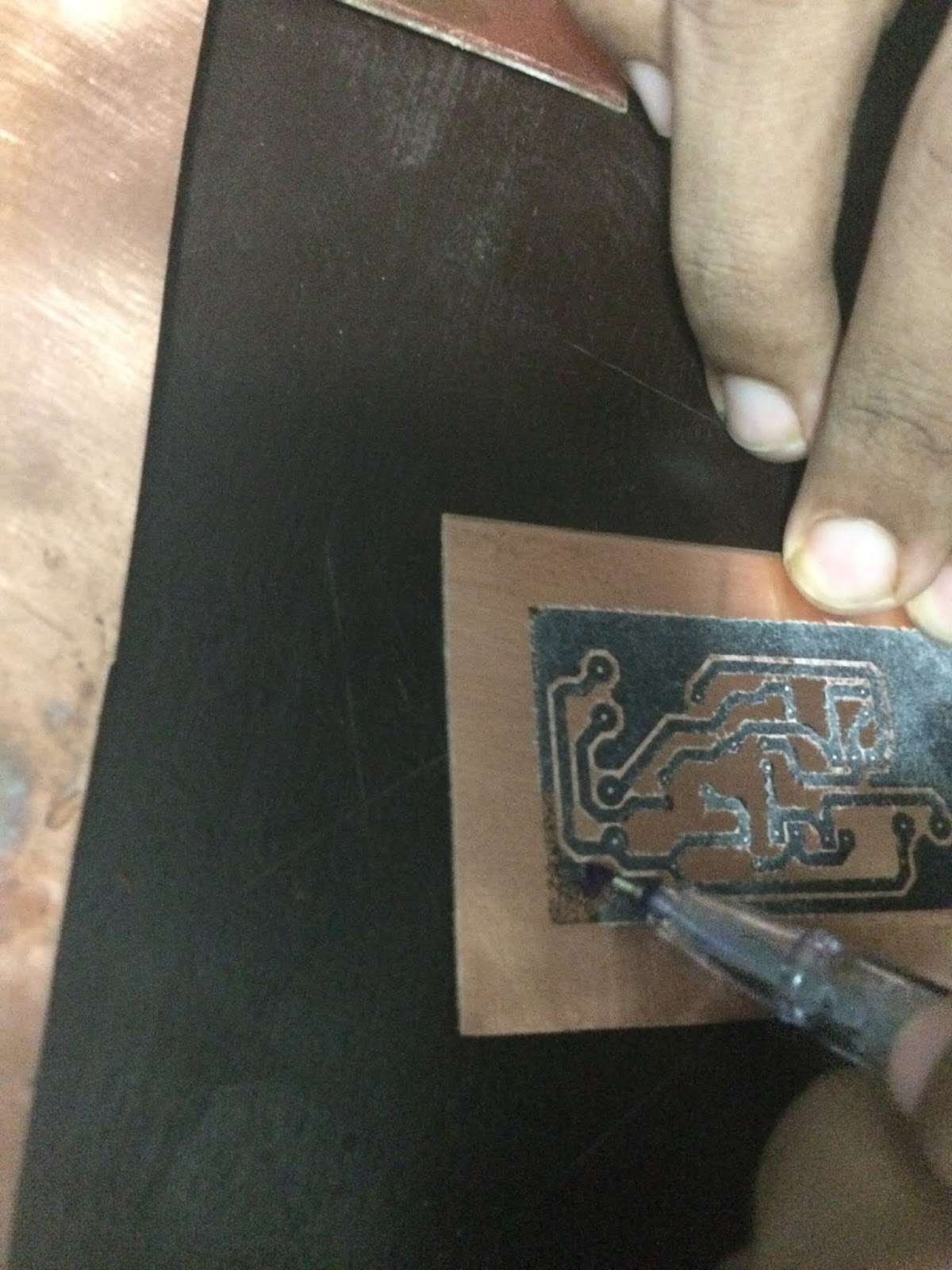
Repair the damage printed part using permanent marker pen
Place printed Board in Ferric Chloride until unwanted copper part removed
Wash and remove the paint
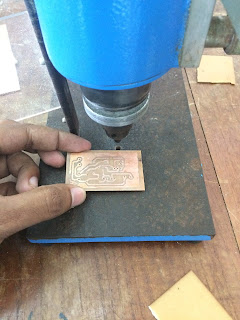
then drill the holes using correct drill bit (commonly drill bit = 0.8 mm)
Mount the component and solder
If You want top side of the board also can printed using same method if there is no top copper you can print components layout in the top site of board.(if you print the top side it must have get printout with mirroring)
property file is use for store data which need to change outside of the project.This is an example for use property file.
the property file is saved in "setting/setting.properties"
property file
setting.properties
# To change this license header, choose License Headers in Project Properties.
# To change this template file, choose Tools | Templates # and open the template in the editor.
ip=127.0.0.1
port=6262
Code
Main.java
/*
 * To change this license header, choose License Headers in Project Properties.
 * To change this template file, choose Tools | Templates
 * and open the template in the editor.
 */
package rubictron.main;

import java.io.File;
import java.io.FileNotFoundException;
import java.io.FileReader;
import java.io.IOException;
import java.util.Properties;
import java.util.logging.Level;
import java.util.logging.Logger;
import javafx.application.Application;
import javafx.stage.Stage;

/**
 *
 * @author rubictron
 */
public class Main extends Application {

    @Override
    public void start(Stage primaryStage) {
        FileReader reader=null;
        try {

            Properties setting=new Properties();//create new property

            File file=new File("setting/setting.properties");//get file
            reader = new FileReader(file);//read file
            setting.load(reader);//load file to property
            System.out.println("ip= "+setting.getProperty("ip"));
            System.out.println("port= "+setting.getProperty("port"));


        } catch (FileNotFoundException ex) {
            Logger.getLogger(Main.class.getName()).log(Level.SEVERE, null, ex);
        } catch (IOException ex) {
            Logger.getLogger(Main.class.getName()).log(Level.SEVERE, null, ex);
        } finally {
            try {
                reader.close();
            } catch (IOException ex) {
                Logger.getLogger(Main.class.getName()).log(Level.SEVERE, null, ex);
            }
        }
    }

    /**
     * @param args the command line arguments
     */
    public static void main(String[] args) {
        launch(args);
    }

}
This is my github repository for complete Login system using PHP , HTML , JS , CSS .
The System has feature to login exist user and register new user . The username and passwords are stored in the database.the password is stored with encrypted. In every page check the users login status using session.redirect to the login page when seesion is time out. .You can this login system to your php website simply copy and past the directory and change the file path of home page and dashboard.
The code on below shows how to initialize the reset function for arduino code and use it while coding.I had reset the arduino after 5000ms delay.
void(* resetFunc) (void) = 0; //initialize the reset function

void setup() {
// put your setup code here, to run once:
  }

void loop() {
// put your main code here, to run repeatedly:
delay(5000);
resetFunc();  //you can call this method to reset your arduino
  }
In LaTeX you can easily reference almost anything that is numbered (sections, figures, formulas), and LaTeX will take care of numbering, updating it whenever necessary. The commands to be used do not depend on what you are referencing.
\begin{figure}[H]
\begin{center}
\includegraphics[width=0.9\textwidth]{01_chapters/01/figs/exsample.jpg}
\end{center}
\caption{Image Caption}
\label{fig:figure1}
\end{figure}

The figure can reference as figure \ref{fig:figure1} in the page \pageref{fig:figure1}
When you create PHP project you must host it to PHP enable host. Normally it uploaded to local host on computer which create by apachi. In the intellij idea no need to uplode every time that we change the project we can use the configaration setting to uplode it and load through browser.
There is the basic linux command and it's operation
ls – List
ls lists the contents (files and folders) of the current working directory.
mkdir – Make Directory
mkdir makes (or creates) a new directory.
pwd – Print Working Directory
pwd prints the current working directory.
cd – Change Directory
cd sets the given folder (or directory) as the current working directory for the current running session of the terminal
rmdir – Remove Directory
rmdir removes (or deletes) the given directory.
rm – Remove
rm removes the given file or folder. You can use rm -r to delete folders recursively.
cp – Copy
cp copies the file or folder from one location to another location. You can use its cp -r option to copy folders recursively.
mv – Move
mv moves a file or folder from one location to another location.
help
--help lists all the available commands in the terminal. You can use ‘-h’ or ‘–help’ (help has two hyphens here) option with any command to get help for that specific command.
man – Manual
man shows the manual page for the given command.
who – Who Is logged in
who shows the list of currently logged in users.
exit
exit ends the current terminal (bash) session.
shutdown
shutdown shuts down your computer. You can use shutdown -r to restart your computer.
You can refer this screenshots to get best understand of above commands